Start with their feelings
When your child is old enough, include them in the choice. If they do not want a moment shared, respect that.
 seenow!
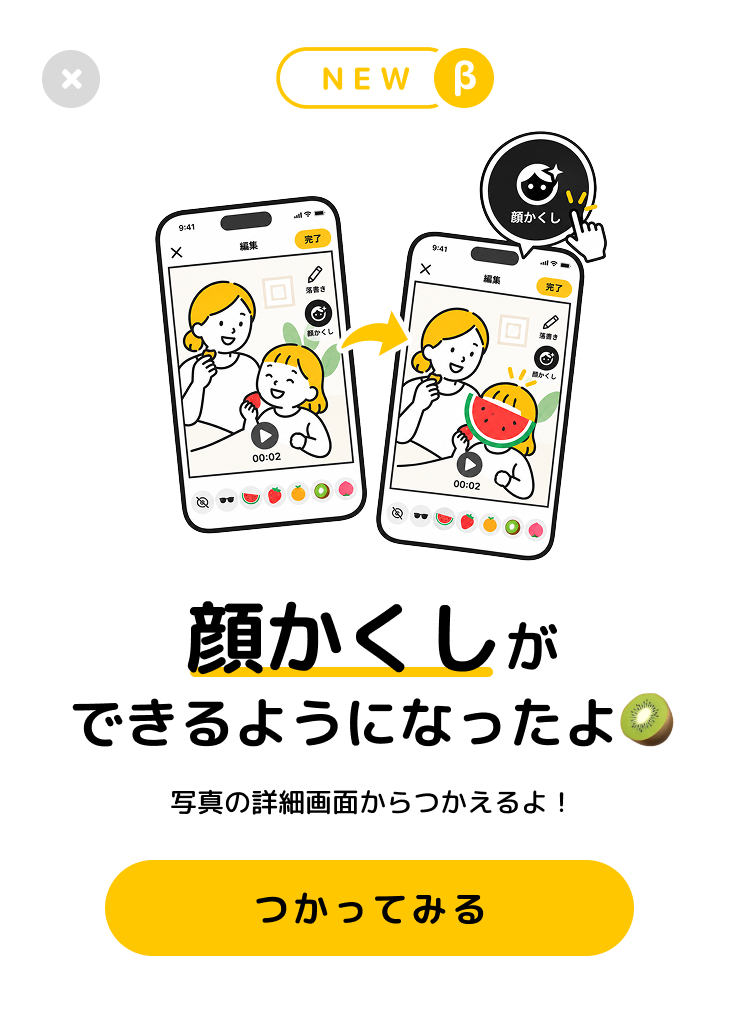
NEW / βNew in seenow! · Face cover
AI makes it automatic and easy.
Add a little fun with cute stickers 🍉
Face cover β is available now
01 / AUTOMATIC. EASY. YOURS.
AI detects faces and adjusts each sticker to fit. In videos, stickers follow moving faces automatically. Choose a sticker you like, then check the result.
Watermelon, strawberry, orange, kiwi, or peach: pick one to match the moment. You can also choose sunglasses to cover just the eyes.
How to use it in the app Face cover preview
Pick a sticker for each face
In the app, sticker sizes adjust to fit faces automatically. You can also fine-tune their position, size, and angle.
02 / USING FACE COVER β
Choose a photo or video in Memories. Open its detail view, then tap the share icon to enter the editor.
For photos and two-second videos.Face cover β detects faces and sizes the stickers automatically. In videos, the stickers follow moving faces, too.
Pick your sticker. Fine-tune it if you need to.Review the result and save it. Before sharing, check the saved photo or video to make sure the faces are covered as you intended.
Watch saved videos from start to finish.A name tag, a familiar background, a name spoken out loud. Consider who will see it and how your child feels. Covering a face alone does not guarantee that someone cannot be identified.
Face cover β is available in the latest version of seenow! for iOS and Android. Update your app to use it.
03 / WHY WE MADE THIS
That little laugh is worth sharing. Your child’s privacy is worth caring for, too. We want families to enjoy both, with simple choices about what to show and who gets to see it.
Children grow up with the memories we share today. Putting their best interests first means pausing to consider their feelings, their privacy, and how they might feel about a post later on.
When your child is old enough, include them in the choice. If they do not want a moment shared, respect that.
A moment for grandparents does not always need a wider audience. Think about the people and details you want to include.
Face cover is one small tool for making thoughtful choices. Check the whole photo or video, and decide whether sharing feels right.
FOR PRESS
Sharing children’s lives online is often called “sharenting.” Face cover β opens a conversation about children’s privacy, families’ choices, and how everyday app features can support both.
QUESTIONS
Use photos and videos opened from Memories in seenow! Open the editor from the share icon in the detail view, then choose face cover β.
No. Face cover helps you show less of a face, but it does not guarantee anonymity. Sunglasses cover only the eyes. Even with fruit stickers, check for missed faces or slipping stickers. Watch saved videos all the way through, and consider names, backgrounds, voices, and who you share with.
Face detection runs on your device. Saving photos and videos to seenow! and sharing them in groups uses servers. See our privacy policy for how the app handles data overall.
Face cover β places stickers over faces. We have not verified its effectiveness at preventing face recognition or the extraction of facial features. It does not delete existing facial data. Use it to choose how much of a face you show.
Yes. It is available in the latest version of seenow! for iOS and Android. Update your app to try it. We are continuing to improve the beta.
YOUR FAMILY’S EVERYDAY VLOG.
Update seenow! and share today’s memories with a little help from cute stickers.
More about seenow!